I Switched to a USB-C Ecosystem for My Phone Setup — Here’s What Changed
350 views
The final straw was a dead power bank.
Not because the battery had failed. The power bank was fine. My phone was fine. The cable in my bag was the problem.
I had USB-C to USB-C for my laptop, USB-C to Lightning for an older accessory, USB-A to USB-C in the car, and one mysterious cable that charged some devices slowly and refused to connect others at all. My desk drawer looked organized right up until I actually needed something.
So I started simplifying.
The goal wasn't to buy every USB-C gadget on the market. It was to build a phone setup around one connector standard and understand what that standard could—and couldn't—replace. After living with a USB-C-first setup across charging, data transfer, displays, storage, and travel gear, the biggest change wasn't convenience.
It was predictability.
Mostly, anyway.
The first surprise: USB-C doesn't mean one cable does everything
This is the part that trips people up.
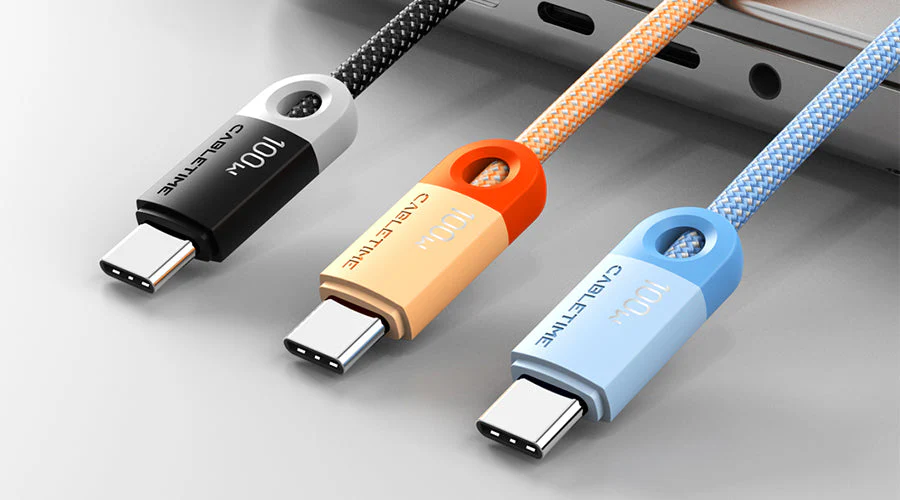
USB-C describes the connector shape. It does not automatically tell you the cable's charging speed, data rate, display capability, or feature support.
I learned that the mildly annoying way.
A cheap USB-C cable that happily charged my phone at 15W didn't necessarily support high-speed data. Another cable moved files but wasn't rated for the higher USB Power Delivery profiles I wanted from a laptop charger. Then there are USB4 and Thunderbolt cables, which add another layer of capability—and price.
A connector standard, it turns out, is not a capability standard.
The USB Implementers Forum's current ecosystem includes specifications such as USB 2.0 at up to 480 Mbps, USB 3.2 with multiple speed tiers, and USB4 beginning at 20 Gbps and reaching higher performance levels depending on the implementation. The practical lesson is simpler than the naming scheme: read the cable and device specifications instead of trusting the USB-C plug.
That changed how I bought cables.
I stopped treating them as interchangeable accessories and started assigning them jobs.
A short, high-wattage USB-C cable stays with my main charger.
A properly rated USB data cable lives near my computer.
A longer cable handles bedside charging, where transfer speed doesn't matter.
One spare travels in my bag.
Four cables. Fewer mysteries.
My charging setup got smaller, but the charging math got more interesting
The obvious advantage of USB-C is consolidation.
My phone, tablet, wireless-earbud case, power bank, and laptop can all charge from USB-C. That meant I could retire several old charging bricks and keep one multi-port charger on my desk.
But wattage matters.
A 20W USB-C charger may be perfectly adequate for a phone yet painfully slow for a laptop under load. A 65W charger can handle many ultraportables, but adding a second device may cause the charger to redistribute power between ports.
That redistribution is easy to miss.
For example, a charger marketed as "100W" might not provide 100W to every port simultaneously. One USB-C port may support 100W alone, while two connected devices might split into a 65W + 30W configuration. The exact allocation depends on the charger.
I now check the fine print before buying.
For phones, USB Power Delivery (USB PD) is especially useful because compatible devices and chargers negotiate power rather than blindly pushing a fixed amount. USB PD 3.1 extends the specification to higher power levels, including Extended Power Range profiles that can reach 240W for supported hardware and cables.
My phone doesn't need anything close to that. Thankfully.
The benefit is ecosystem flexibility. The same USB-C charger that tops up a phone can also power a tablet, handheld console, or compatible laptop—assuming the charger, cable, and device all agree on the required power profile.
That's the phrase to remember: all three have to agree.
The cable drawer finally became boring
And boring is good.
Before switching, every new accessory triggered the same question: What cable does this use?
Now the question is usually different: What kind of USB-C cable does this actually need?
That sounds like a minor distinction. It isn't.
USB-C gave me a much cleaner travel setup. A compact multi-port GaN charger, two good USB-C cables, and a small power bank cover almost everything I normally carry.
GaN chargers are particularly useful here because gallium nitride designs can deliver substantial power in relatively compact hardware compared with older, bulkier charger designs. Still, "GaN" isn't a performance guarantee. Port layout, sustained output, thermal behavior, and power sharing matter more than the marketing label printed on the box.
One mistake I made was buying an inexpensive multi-port charger based almost entirely on its maximum wattage.
Bad move.
It technically delivered the advertised total output, but the port-sharing behavior made it awkward for my setup. Plugging in my laptop changed how much power was available to the phone. Not dangerous. Just irritating.
I replaced it with a charger whose power allocation table was clearly documented.
That tiny detail saved a surprising amount of frustration.
File transfers became dramatically less annoying
This was the upgrade I underestimated.
Charging gets all the attention, but USB-C can be far more useful for moving data—particularly on phones that support faster USB transfer modes.
There's an important catch, though: the connector doesn't guarantee speed.
Some phones with USB-C still use USB 2.0-level data transfer, capped at a theoretical 480 Mbps. Others support substantially faster connections. Apple's iPhone 15 Pro and later Pro-class models, for example, support USB 3 transfer speeds when paired with an appropriate cable, while the standard USB-C implementation on some other devices may remain at USB 2.0 speeds.
That difference is enormous when you're copying large video files.
A few photos? No big deal.
Several gigabytes of 4K footage? Now the cable specification suddenly matters.
On Android, connecting a phone to a computer can also expose several USB modes, such as charging, file transfer, USB tethering, MIDI, and photo transfer. I've had occasions where the phone connected, started charging, and appeared completely absent from the file manager because it defaulted to charging mode.
The cable wasn't broken.
The phone wasn't broken either.
I just had to unlock it and switch the USB connection mode to file transfer.
Classic USB friction. Still alive and well.
External storage became part of my phone setup
USB-C also made external storage practical enough that I actually use it.
A small USB-C flash drive or portable SSD can connect directly to many modern phones, although compatibility depends on the phone's operating system, file system support, available power, and USB implementation.
This is especially useful for video.
Some professional mobile workflows now support recording or working directly with external storage under specific conditions. Apple's Pro iPhone models, for instance, have supported workflows involving external USB-C storage for certain high-bandwidth video formats and recording features, subject to device and storage requirements.
The practical benefit isn't just speed.
It's capacity management.
Instead of constantly asking, "Do I need to delete 40 GB of old footage before recording?" I can move large files to external storage without waiting for a cloud upload or opening a laptop.
There are limits. A portable SSD that works flawlessly with a laptop can draw more power than a phone wants to supply. Some drives need a powered hub or external power source. File systems can matter too; exFAT tends to be broadly useful for moving large files between modern operating systems, while other formats may introduce compatibility restrictions.
So yes, USB-C storage is convenient.
No, every drive won't behave identically.
The desk setup changed more than the phone itself
Once USB-C became the default connection, my phone stopped feeling like an isolated device.
A single USB-C hub can potentially connect compatible hardware to Ethernet, USB storage, HDMI or DisplayPort output, card readers, and additional USB peripherals. Support varies heavily by phone and operating system, but the basic setup has become much more realistic than it was a few years ago.
Samsung DeX is a good example. On supported Galaxy devices, it can provide a desktop-style interface on an external display. Other Android phones may support video output through DisplayPort Alternate Mode, while some don't expose external display functionality in the same way.
That variability matters.
I wouldn't buy a USB-C dock before checking the exact phone model's specifications. Two phones can have identical-looking USB-C ports and radically different capabilities.
The same goes for displays.
Some USB-C monitors accept video, data, and power through one cable. Connect a compatible laptop and the setup can be beautifully clean. Connect a phone, though, and you may discover that the phone doesn't support video output over USB-C at all.
One port. Different rules.
The ecosystem isn't as universal as the marketing suggests
Here's where my enthusiasm cooled slightly.
USB-C solved the connector problem better than it solved the compatibility problem.
USB Power Delivery profiles vary. USB data speeds vary. Display output varies. USB-C hubs can behave differently depending on the host device. Even cables that look nearly identical can have completely different capabilities.
Then there's labeling.
USB naming has historically been a mess. "USB 3.0," "USB 3.1 Gen 1," and "USB 3.2 Gen 1" have all been associated with the same basic 5 Gbps class at different points in the branding evolution. A shopper standing in front of a wall of cables shouldn't need a family tree to understand transfer speeds.
Yet here we are.
My workaround is simple: I buy based on explicit capabilities.
For a charging cable, I look for the supported wattage.
For data, I look for the stated transfer rate.
For a display cable, I check whether the required video mode is explicitly supported.
If those details aren't clearly listed, I move on.
What I actually recommend buying
You don't need to replace everything at once.
Start with the pieces that remove the most friction.
A reputable multi-port USB-C charger with enough power for your largest device and a clearly published port-sharing chart.
Two or three properly labeled USB-C cables, rather than a dozen anonymous cables of unknown capability.
A compact power bank with USB-C input and output, so the same cable can recharge both the bank and the phone.
A USB-C hub only if your phone supports the features you need, especially external display output.
External USB-C storage if you regularly shoot high-resolution photos or video and your phone supports the workflow you want.
The key is to buy for your actual bottleneck.
If your biggest problem is charging, don't spend money on a 40 Gbps USB4 cable. If you're transferring large video projects, though, that cheap charging cable might be the slowest part of the entire workflow.
FAQs
Is every USB-C cable the same?
No. USB-C defines the connector, while cables can differ in charging wattage, USB data speed, display support, and other capabilities.
Can one USB-C charger charge my phone and laptop?
Usually, yes, if it provides enough wattage and supports the required charging standard. Check both the charger's per-port output and how power is divided when multiple devices are connected.
Does USB-C automatically mean faster file transfers?
Not at all. Some USB-C devices operate at USB 2.0 speeds, while others support much faster USB 3.x or USB4 connections.
Can I connect an external SSD directly to my phone?
Many modern phones support external storage, but compatibility depends on the phone, operating system, drive power requirements, cable, and file system.
Can USB-C connect my phone to a monitor?
Some phones support video output through USB-C, often using DisplayPort Alternate Mode or a manufacturer-specific desktop feature such as Samsung DeX. Check your exact model before buying a dock or monitor.
The real change was confidence
After a few months, the best part of moving to a USB-C ecosystem wasn't having fewer cables on my desk.
It was knowing what to expect.
I can grab one charger for a weekend trip and reasonably expect it to handle my phone, tablet, power bank, and laptop. I can move large files directly when the hardware supports the speed I need. I can connect storage without treating the phone as a sealed box that only talks to the cloud.
There are still traps. USB-C is a connector, not a magic compatibility spell. Buy the wrong cable and you'll discover that quickly.
But once you standardize around a few well-chosen chargers, cables, and accessories—and verify the actual USB and power specifications behind them—the setup gets refreshingly dull.
That's exactly what I wanted.
If you're thinking about making the switch, don't start by replacing every cable you own. Pick the one part of your phone setup that annoys you most, fix that with properly specified USB-C hardware, then build outward from there.
USB-C accessories
phone setup guide
USB-C charging
smartphone accessories 2026
Android and iPhone USB-C
mobile tech setup
Found this helpful? Share it!